
NewDocument management for projects

Control every project document inside SharePoint

Number, review, sign and share drawings and documents with your team, clients and vendors. No new platform, no new logins.

    Enter a valid work email
    Step 2 of 2: who should we call?

    Free demo and quote · Takes 30 seconds · No obligation
    Runs inside
    Greenfield Logistics Park, Phase 2 PRJ-GLP-002 In progress
    Project users 18
    Active workflows 7
    Transmittals sent 42
    My tasks 5
    My action items
    GLP-002-DWG-0142 Site layout, Phase 2 Review
    GLP-002-SPC-0031 Fire safety specification Sign
    GLP-002-RFI-0087 Drainage connection query Respond
    Document status
    Approved186 In review64 Draft41
    Recent activity Nordex Engineering uploaded Rev C · 2m TR-0042 acknowledged by client · 1h
    ✓ Rev C approved Anika K. signed GLP-002-DWG-0142
    GLP-002-DWG-0142REV C
    Site layout, Phase 2 Draft
    Created from a Word template, number assigned
    The problem

    Stop chasing documents across email and shared drives

    X Site_Layout_register_FINAL_v3 (2).xlsx Excel
    P Site_Layout_review_rev_JK.pptx PowerPoint
    Copy of Site_Layout_latest.pdf Teams chat
    Site_Layout_signed_scan.pdf SharePoint
    Site_Layout_v2_OLD_dont_use.dwg Copilot
    GLP-002-DWG-0142 ✓ Approved
    Site layout, Phase 2 One number. One current revision. Full history.
    C Approved and signed Today
    B Superseded 12 Sep
    A Superseded 28 Aug

    One source of truth

    Every document numbered, with its full revision history.

    GLP-002-DWG-0142 Rev C
    GLP-002-SPC-0031 Rev B
    GLP-002-RPT-0019 Rev A
    AK✓ MR✓ JS
    Due Fri

    Faster approvals

    Review workflows with deadlines, reminders and DocuSign.

    TR-0042✓ Acknowledged
    ToClient, Halden Group
    Documents6 files
    ReplyApproved with comments

    Clean handovers

    Transmittals record what was sent, to whom, and the reply.

    Nothing new to learn

    Works in SharePoint, Teams, Outlook and Word.

    Review requested GLP-002-DWG-0142

    Why MPower365
    Project Document Management System

    More than storage — a complete project-ready platform.
    MPower365 Project Document Management System
    • Built on Microsoft 365

      Leverage SharePoint, Teams, and Outlook.

    • Familiar Experience

      Adopt quickly with tools your teams already use.

    • Rapid Deployment

      Preconfigured workflows for quick time-to-value.

    • Scalable & Secure

      Future-ready, built for large and complex projects.

    • Compliance by Design

      ISO and regulatory needs embedded.

    Product tour

    From first draft to final transmittal

    1 of 9
    Set up Review Deliver
    SharePoint
    Search this site
    RM
    Document ManagementGreenfield Logistics Park – Phase 2(PRJ-GLP-002)
    In Progress
    Dashboard
    Admin
    Project Manager
    Document Engineer
    Document Controller
    Approver/Reviewer
    Visitor
    Documents
    Create Document
    In Progress
    Published
    All
    Workflows
    Transmittals
    Tasks
    Vendors
    Activities Log
    Settings
    My Action ItemsTasks requiring attention5 open
    GLP-002-STR-DWG-0143Approve
    Warehouse B – Base Plate DetailsDue 22/10/2026
    GLP-002-FPR-SPC-0031Sign
    Fire Suppression SpecificationDue 24/10/2026
    GLP-002-CIV-RFI-0087Respond
    Drainage Connection at Gate 3Due 25/10/2026
    GLP-002-MEP-DWG-0219Review
    Dock Leveller Power LayoutDue 28/10/2026
    GLP-002-ARC-DWG-0311Review
    Warehouse B – Façade ElevationsDue 30/10/2026
    Project Users
    18Members with site access
    Active Workflows
    7Currently in progress
    Transmittals Sent
    42Total sent to external parties
    My Tasks
    5Pending tasks assigned to you
    Document Status
    Total Documents291
    With Attachments278
    Without Attachments13
    Recent ActivitiesProject activity timeline17 Recent
    15/10/2026
    PRpriya.raman@nordexeng.comUploaded revision10:42 am
    Document: GLP-002-STR-DWG-0142Revision: Rev C · Warehouse B – Column LayoutComment: Column sizes updated at grid lines 4–7
    RMravi.menon@greenfieldlogistics.comWorkflow started09:58 am
    Design Review – Warehouse B Base Plate DetailsStages: Structural HOD Review → QA/QC Review
    Project Settings
    Configure your project settings, permissions, and workflows.
    GeneralDocumentsColumnsTransmittalUser ManagementVendorsWorkflows
    DATE & TIME FORMAT Override the global date and time display format for this project. Leave unchanged to use the admin-level default. Date Format
    DD/MM/YYYY (e.g. 15/10/2026)
    Time Format
    24-hour (e.g. 14:30)
    Save
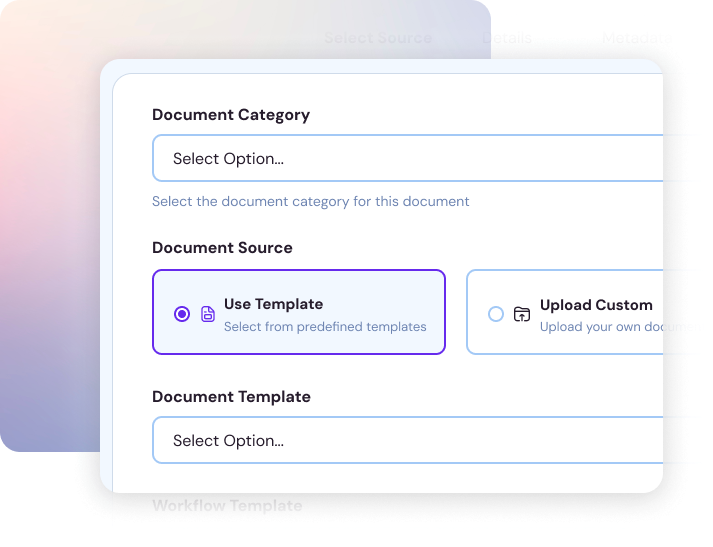
    Create Document
    Document details
    1Select Source
    2Details
    3Tasks
    4Metadata
    5Preview
    Document Category
    Drawings – Structural
    Select the document category for this document
    Package
    PKG-04 · Warehouse B Superstructure
    Group this document under a package. You can create a new one on the fly.
    Document Source
    Use TemplateSelect from predefined templates
    Upload CustomUpload your own document
    External DocumentProvided by external party
    Document Template
    Structural Drawing – A1 Landscape (STR-DWG.dotx)
    Workflow Template
    Design Review – 2 StagesStructural HOD Review → QA/QC Department Review · E-signature on both stages
    Optional: Select a workflow template to automatically create a workflow for this document.
    GLP-002-STR-DWG-0143.docx
    Add
    Documents
    Add Stage
    Structural HOD Review
    Stage Name
    Structural HOD Review
    Approval Type
    Any one approverAll approvers
    Approvers
    RMRavi Menon
    Due Date
    22/10/2026
    Require E-Signature
    Check base plate detail at grid C/7
    QA/QC Department Review
    Stage Name
    QA/QC Department Review
    Approval Type
    Any one approverAll approvers
    Approvers
    SASara Ali
    Due Date
    27/10/2026
    Require E-Signature
    Confirm weld symbols and NDT scope
    UpdateSave & Start
    Notifications
    15/10/2026, 10:42:18 am
    iApproval Required
    Your approval is required for stage Structural HOD Review in workflow Design Review – Warehouse B Base Plate Details (Project: PRJ-GLP-002).
    PROJECTPRJ-GLP-002
    WORKFLOWDesign Review – Warehouse B Base Plate Details
    STAGEStructural HOD Review
    STATUSIn Progress
    DUE DATE22/10/2026
    APPROVERSravi.menon@greenfieldlogistics.com
    15/10/2026, 10:41:55 am
    iWorkflow Started
    The workflow Design Review – Warehouse B Base Plate Details has been started in project PRJ-GLP-002.
    PROJECTPRJ-GLP-002
    WORKFLOWDesign Review – Warehouse B Base Plate Details
    STATUSIn Progress
    TOTAL STAGES2
    CURRENT STAGEStructural HOD Review
    CURRENT DUE DATE22/10/2026
    Show all
    Review Stage: Structural HOD Review
    Check base plate detail at grid C/7 against calc sheet Rev B.
    Add a note (optional):
    Checked against calc sheet Rev B. Base plate at C/7 revised to 25 mm with 4 × M24 anchors. Approved for QA/QC review.
    CancelRejectSign & Approve
    Warehouse B Structural Package for Client Approval
    TR-GLP-002-0042 · Halden Group
    Due Date:  30/10/2026Sent Recipients & Message
    Documents Sent to Recipients
    Documents that have been sent to recipients
    Document NameStatusPurposeMessageDue DateRevision
    Warehouse B – Column LayoutApprovedFor ApprovalRev C for construction, please approve.30/10/2026REV-C
    Warehouse B – Base Plate DetailsPendingFor ApprovalBase plates revised at grid C/7.30/10/2026REV-A
    Portal Frame CalculationsAcknowledgedFor InformationSupporting calcs, no action needed.30/10/2026REV-B
    Documents Requested from Recipients
    Documents that have been requested from recipients
    Document NameStatusAttachmentsMessageDue DateUploaded ByUploaded On
    Updated Geotechnical Report – Zone BPending–Please share the latest borehole logs.25/10/2026––
    Signed Site Access PermitUploadedgate3_permit.pdfSigned permit for gate 3 access.20/10/2026James Harris14/10/2026
    Custom Uploads
    Documents uploaded by external recipients for this transmittal
    TitleMessageUploaded ByCreatedAttachment
    Site Photos – Zone B FootingsTaken after rebar inspectionJames Harris14/10/2026zoneB_footings.zip
    Document ManagementProject Document Management System
    Projects
    52 total projects in the system
    AllSearch projects...
    Project NameProject CodeStageReview DateCategoryStart DateEnd Date
    Al Noor Medical Centre ExtensionANM-2026-HC-014In Progress28/10/2026Healthcare12/01/202630/06/2027
    Al Wasl Metro Depot ExpansionAWM-2026-INF-005Draft–Infrastructure––
    Coastal Highway Retaining WallsCHR-2026-CIV-011In Progress05/11/2026Construction16/03/202620/12/2026
    Desert Rose Solar Farm – Stage 1DRS-2026-EN-002In Progress19/10/2026Energy01/04/202631/03/2027
    Greenfield Logistics Park – Phase 2PRJ-GLP-002In Progress22/10/2026Construction03/02/202618/12/2027
    Harbourfront Residential Towers B & CHRT-2025-RES-007In Progress30/10/2026Residential21/09/202515/03/2028
    Northern Ring Road InterchangeNRR-2024-INF-003Completed–Infrastructure04/03/202428/08/2026
    Plant Control System Upgrade – WAPCS-2026-IND-009Draft–Industrial––
    Riverside Water Treatment UpgradeRWT-2026-UT-021Draft–Utilities––
    Westgate Data Centre Fit-outWDC-2026-COM-011In Progress12/11/2026Commercial10/06/202622/04/2027
    123456
    Projects by Stages3 Stages
    In Progress60%31
    Draft27%14
    Completed13%7
    Projects by Category9 Categories
    Construction23%12
    Infrastructure17%9
    Industrial13%7
    Commercial12%6
    Residential10%5
    Energy8%4
    Healthcare6%3
    Greenfield Logistics Park – Phase 2
    Transmittal: Warehouse B Structural Package for Client Approval (TR-GLP-002-0042)
    Comments j.harris@haldengroup.com
    Overview
    Shared and requested documents
    Shared Documents
    3 total
    1Approved1Acknowledged0Rejected1Pending
    Requested Documents
    2 total
    1Uploaded0Denied1Pending0Overdue
    Shared Documents
    Download and manage attachments; approve or reject as needed
    Document NameStatusPurposeDue DateMessageTypeDate SharedActions
    Column LayoutApprovedFor Approval30/10/2026, 11:59:59 pmRev C for construction, please approve.dwg14/10/2026, 9:27:50 am
    Base Plate DetailsPendingFor Approval30/10/2026, 11:59:59 pmBase plates revised at grid C/7.dwg14/10/2026, 9:27:50 am
    Portal Frame CalcsAcknowledgedFor Information30/10/2026, 11:59:59 pmSupporting calcs, no action needed.xlsx14/10/2026, 9:27:50 am
    I confirm that I have uploaded all requested documents.
    Submit Transmittal
    Powered by MPower365
    Vendor portal

    One workspace for every vendor

    Requests, chat and submissions in one place. Vendors sign in with a one-time code, no Microsoft 365 account needed.

    MPower365

    Overview
    Needs attention
    Documents
    Packages
    Chat
    NORDEX ENGINEERING
    Projects
    Users
    Groups
    Document access
    Company
    Profile
    PRPriya RamanAdmin
    Sign out
    ProjectsGreenfield Logistics Park – Phase 2Chat Greenfield Logistics Park … Nordex Engineering
    Chat
    Messages with the project team, on the project and on individual documents.
    Search conversations
    Project conversation09:12 amCrane delivery to gate 3 confirmed for 21 Oct.
    GLP-002-STR-DWG-014202:38 pmSara Ali: Thanks Priya, starting QA/QC…
    GLP-002-STR-DWG-0143YesterdayCan you confirm the anchor bolt grade?
    GLP-002-STR-CAL-001812 OctCalcs accepted, no further comments.
    GLP-002-STR-DWG-0142 · Warehouse B – Column LayoutDocument conversation · 3 participantsView details
    TODAY
    RM
    Ravi Menon  11:05 am
    Please revise the columns at grid lines 4–7 for the new crane loads and resubmit by Friday.
    02:31 pm  You
    Rev C uploaded. Columns at 4–7 upsized to UC 356×406×235, base plates updated to match.
    PR
    SA
    Sara Ali  02:38 pm
    Thanks Priya, starting QA/QC review now.
    @#Write a message...
    Enter to send · Shift+Enter for a new line · @ mention · # document
    PR Priya Raman Nordex Engineering · Vendor
    Signed in withOne-time code ✓ Open requests3 Microsoft 365 accountNot needed
    1 Onboard the vendor Register the vendor once and use them on any project.
    2 Share with a clear request Ask for review, comments or a revision, and set a due date.
    3 Vendors see what is waiting Each vendor gets their own workspace with every open request.
    4 Chat next to the document Every shared document has its own thread, so nothing gets lost in email.
    5 Vendor submits a revision Updated files are uploaded straight against the shared document.
    6 Accept or reject Accepted files become a new version with the number and history kept.
    Copilot enabled

    Upload a file. Copilot summarises it and fills in the metadata.

    You review the suggestions before anything is saved. Summaries stay with the document.

    AI summary Get the gist before you open the file.
    Suggested metadata Fields pre-filled for uploaded files.
    You approve Nothing is saved without your OK.
    Kept with the file Summaries stay on the document.

    ★ Needs a Microsoft 365 Copilot licence for each user, and AI enabled in your PDMS plan.

    Fire safety specification.docx Uploaded just now · 2.4 MB Copilot is reading…
    AI summary
    Suggested metadata
    Document type
    Discipline
    Revision
    Project
    Edit Approve and save
    Why SharePoint

    Use the Microsoft 365 you already pay for

    Separate platform
    ✕ FilesStored in another cloud
    ✕ Sign-inNew accounts and passwords
    ✕ Daily toolsA new app to learn
    ✕ Vendors & clientsAccounts to manage
    PDMS Runs in your tenant
    ✓ FilesStay in your SharePoint
    ✓ Sign-inMicrosoft 365, with MFA
    ✓ Daily toolsTeams, Outlook and Word
    ✓ Vendors & clientsSecure link or one-time code
    FAQ

    Common questions

    AKMR Anything else, ask a PDMS specialist on your demo call.

    Yes. PDMS runs on your SharePoint Online site, and your team signs in with their usual Microsoft 365 account.

    See PDMS on a project like yours

    Free demo and quote. No obligation.

    Get a free demo and quote

      Enter a valid work email
      Step 2 of 2: who should we call?

      What happens next
      1 A PDMS specialist contacts you to pick a demo slot.
      2 We walk through PDMS on a project like yours.
      3 You get a quote for your team and vendors.